

Last Updated: Dec 24, 2025
Introduction
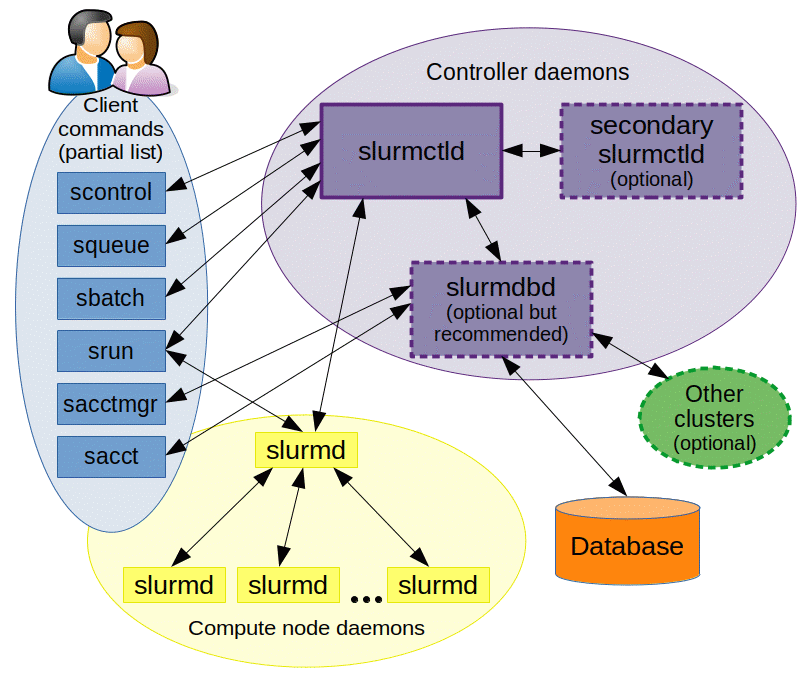
After you've setup your Slurm cluster, here are some useful commands to know on order to interact with your cluster.
Prerequisites
- Crusoe Cloud account
- Access to the Crusoe Cloud UI or Crusoe CLI
- A Slurm Cluster
Commands:
Command |
Output / Options |
Notes |
| sinfo |
After SSHing into your login node, sinfo is used to view partition and node information. In this example, I have a slurm cluster of 2 nodes that are currently idle. |
|
| squeue |
|
squeue is used to view job and job step information for jobs managed by Slurm. |
| srun |
srun will allow you to run parallel jobs across your cluster.
For example, to view all PCIe buses and devices attached to a node you would run:
If you're using Infiniband, you can run a simple two node NCCL test to validate internode RDMA performance.
|
|
| sbatch |
sbatch submits a batch script to Slurm.
In this example, a simple job is running across my cluster of 2 nodes. I then used squeue to view the job.
|
|
| scancel | scancel is used to signal or cancel jobs, job arrays or job steps. | |
| scontrol |
|
scontrol is used to view or modify Slurm configuration including: job, job step, node, partition, reservation, and overall system configuration.
For example,
|
| sdiag |
... |
sdiag shows information related to slurmctld execution about: threads, agents, jobs, and scheduling algorithms. |
| sacct | Manipulates accounts, groups and jobs, queries |
sacct command displays job accounting data stored in the job accounting log file or Slurm database in a variety of forms for your analysis. The sacct command displays information on jobs, job steps, status, and exitcodes by default. You can tailor the output with the use of the --format= option to specify the fields to be shown. |
| sstat |
sstat command displays job status information for your analysis. The sstat command displays information pertaining to CPU, Task, Node, Resident Set Size (RSS) and Virtual Memory (VM). You can tailor the output with the use of the --fields= option to specify the fields to be shown. |
|
| sprio | sprio is used to view the components of a job's scheduling priority when the multi-factor priority plugin is installed. sprio is a read-only utility that extracts information from the multi-factor priority plugin. By default, sprio returns information for all pending jobs. Options exist to display specific jobs by job ID and user name. |
Additional Resources: